


Exxon Mobil Rewards+
3.611.31K Reviews
App Specs
- Version
- 6.6.0
- Updated On
- License
- Free
- Downloads
- 1,000,000+
- Developer
- ExxonMobil
- Categories
- Maps & Navigation
- Platform
- Android, iOS
Screenshots
 Analysis by AppCompare
I’ve found that the most useful way to judge Exxon Mobil Rewards+ is to ask whether you already stop at Exxon or Mobil stations. It is a free Maps & Navigation app from ExxonMobil, and its appeal is tied to making those visits easier and potentially more rewarding—not to replacing a general-purpose navigation app or helping you compare every fuel brand in town. If those stations fit your routine, the app may earn a place on your phone. If they don’t, its benefits are harder to make worthwhile.
Where setup and visits can get tricky
The basic idea is simple, but a rewards app is only helpful when the account and the purchase connect properly. Before relying on it for a fuel stop, I’d take a moment to sign in and look over the account screens while I’m not in a hurry. That is a more comfortable time to sort out an account prompt or check where the app presents its payment and rewards options than when other drivers are waiting behind me.
I also wouldn’t assume that every step works identically at every station. The app is built around Exxon and Mobil locations, but the actual experience can depend on the station and the way I choose to pay. I’d check the on-screen instructions at the pump or in the app rather than improvising, especially the first time. If a particular payment flow is unclear, using my usual payment method is a sensible fallback; I can try the app again when I have time to investigate.
Small checks that make the routine smoother
Before leaving home, I’d confirm that I can access my account and that the app is ready to use. At the station, I’d identify the correct pump before starting any in-app payment step. That simple pause helps avoid selecting the wrong location or pump number in a busy forecourt. I’d also keep the phone handy and avoid beginning setup while standing beside an active pump.
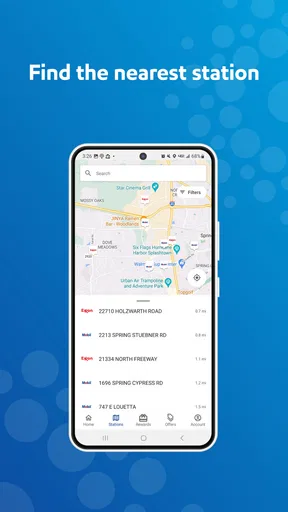
For station finding, the built-in map is useful when I want an Exxon or Mobil stop rather than simply the nearest place to buy fuel. I’d use it to orient myself, then pay attention to road access and the station entrance as I approach. A map pin can help identify a destination, but it doesn’t remove the need to make a safe turn or check that the location suits my route.
The Ultimate Companion for Fuel Savings
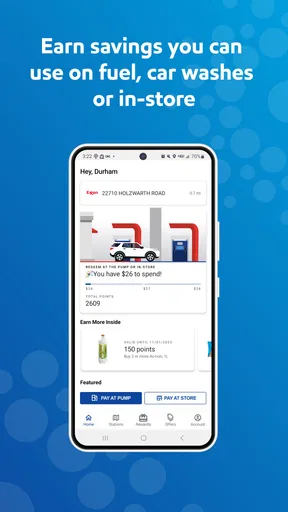
At its core, the Exxon Mobil Rewards+ app is designed to make your life easier while keeping your wallet happy. The first thing you'll notice is how smoothly everything runs. After downloading, setting up your account is a breeze, and you're rewarded with points every time you make a purchase. Whether you're buying gas, grabbing a snack, or even just a quick drink, you're stacking up points like a pro.
Easy Navigation and User-Friendly Interface
One of my favorite things about this app is its user-friendly design. Everything is laid out in a way that makes sense, and you won't find yourself lost in a sea of options. The menu is straightforward, and finding what you need is just a tap away. Need to locate the nearest station? No problem. The app’s built-in map feature directs you right to the closest Exxon or Mobil station without any hassle.
Worth Reading Before You Choose

EA SPORTS FC Mobile 26 Is a Bigger Football Game, but It Takes Time

Flipboard Shows What News Apps Must Do Beyond the Feed

Switching to Android Auto Means Rethinking Your Driving Routine

Google Calendar Makes a Crowded Week Easier to Manage

Ludo King Makes the Most of the Minutes Between Plans

Baby Panda World Brings Quick Play to Modern Phones, but Its Game Library Feels Busy
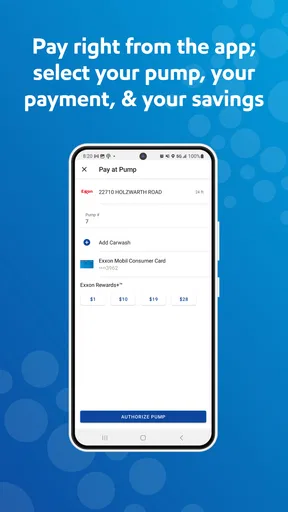
Once you're there, paying through the app is a cinch. Just select your pump, and voilà! You're ready to go. No need to fumble for your card or dig through your bag. It's all about making your life as convenient as possible.
Using points without turning every stop into homework
A useful approach is to treat points as a modest bonus on purchases I was already going to make, rather than a reason to drive farther or buy something I do not need. If I’m choosing between two convenient stops and one is an Exxon or Mobil station I already use, the rewards can be a nice extra. If earning them would mean a detour, I’d weigh the extra drive against the value of the reward instead of assuming the points automatically make the trip cheaper.
The same thinking helps with convenience-store purchases. I’d scan the offers and rewards information when planning a stop, not while deciding impulsively at the counter. That makes it easier to tell whether an offer suits something I actually want. It also avoids treating a promotion as a saving when it leads me to spend more than I planned.
For a regular commute, I can imagine checking the map before setting out, choosing a familiar station along the route, and handling the account or payment steps before I’m under time pressure. On a road trip, I’d use the app as a way to find a brand-specific stop, while keeping a standard map app available for the broader route. That division of labor is practical: one tool can help with general directions, while this one is most relevant to Exxon and Mobil visits.
Maximize Your Rewards
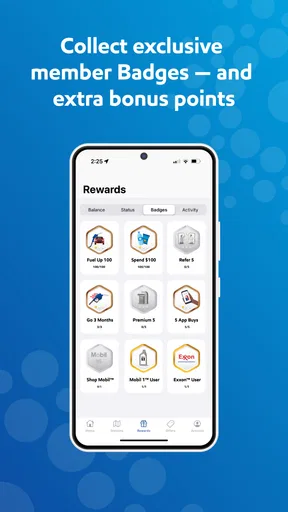
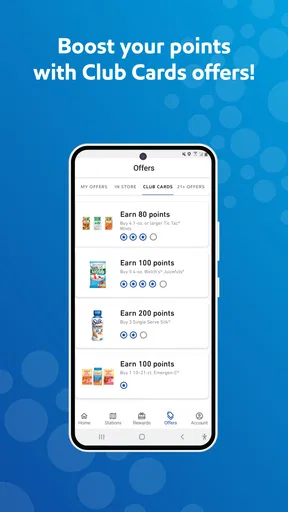
Now, let’s talk about the rewards because, honestly, who doesn't love a good deal? Each gallon you purchase translates into points, and these points can be redeemed for fuel discounts. It's like you're getting paid to fill up your tank! The app also gives you exclusive offers and promotions, which means more savings in your pocket. I’m always on the lookout for those bonus point days—they’re the real MVPs of the app world.
But it’s not just about fuel. The app rewards you for convenience store purchases too. Whether you’re grabbing a quick coffee or some snacks for the road, those points are piling up. It feels great to know that your everyday purchases are working double time for you.
How it fits beside other navigation and payment options
I wouldn’t replace my usual map app with this one if I needed broad route planning, multiple-stop directions, or a neutral view of fuel options from different brands. This app has a narrower job: it connects station discovery with Exxon and Mobil rewards. That focus is a benefit when I know which network I want, but a limitation when I’m comparing all nearby stations or trying to choose the cheapest stop across brands.
Likewise, paying in the app can reduce the need to handle a card at the pump, but it is not the only sensible way to pay. A physical card or another familiar payment method can be a better fallback if I’m short on time, the app needs attention, or I’d rather not manage a phone during a fuel stop. I see the app as an additional option, not a reason to abandon a routine that already works.
Seamless Integration with Your Lifestyle
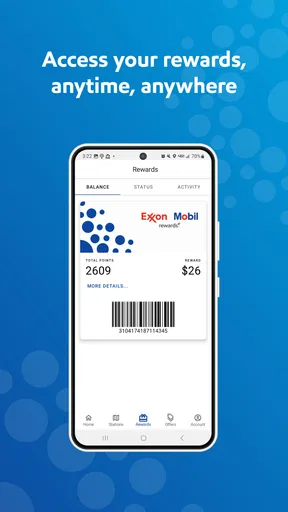
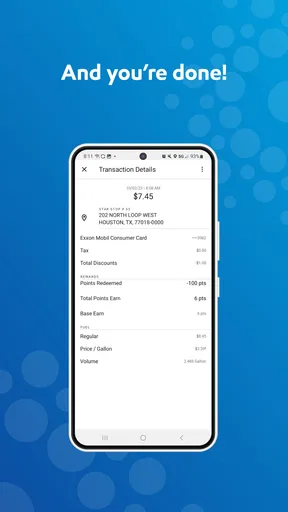
Another big plus is how well the app integrates with my lifestyle. With its secure payment options and effortless account management, everything is in one place. You can even link your credit and debit cards to streamline the payment process further. Plus, it keeps track of all your transactions and rewards, making it easy to see how much you’ve saved over time.
Let's not forget the notifications. They're like little reminders that keep you on top of your rewards game. Whether it's a new promotion or a points update, you’ll always be in the loop. It's like having a personal assistant who’s got your back when it comes to savings.
If a payment or points step doesn’t go as planned
If an in-app payment does not proceed as expected, I’d avoid repeating the same step several times without checking what happened. First I’d look at the app’s displayed status and the pump number, then follow the instructions shown there. If the pump has not started and I’m unsure whether a payment attempt went through, I’d ask station staff or use the station’s normal payment process rather than risk a duplicate attempt. The important thing is to resolve the immediate fueling question first, not troubleshoot while distracted at the pump.
If a purchase does not appear in my rewards activity as I expected, I’d check that I’m signed into the account I meant to use and review the transaction details in the app. Keeping a receipt can make it easier to explain the situation if I need help. I wouldn’t assume that a missing entry means the app has lost the purchase, nor would I count on a reward until it appears in the account. That cautious habit makes it easier to separate a display delay or account mix-up from a genuine issue.
When the app may not be the problem
A station-finding or payment hiccup can come from circumstances around the stop rather than from the app itself. The location may be difficult to enter from the direction I’m travelling, the pump number may be easy to misread, or I may simply be trying to do too much while parked in a busy area. I’d check the physical pump label and follow posted station instructions before concluding that the app is at fault.
It is also worth thinking about whether the chosen station and workflow match what I’m trying to do. If I need the fastest possible stop, an unfamiliar payment process may not be worth learning in the moment. If my main goal is comparing prices across several fuel brands, a general map or fuel-search tool is a better starting point. The app works best when I want an Exxon or Mobil stop and can give its account features a little attention.
Keeping It Secure
Security is a big deal, and the app doesn’t skimp on it. Your information is protected with top-notch security measures, so you can focus on racking up points without worrying about your data. It's a relief to know that the app takes your privacy seriously.
Because payment and account details are involved, I’d still use ordinary care: keep my sign-in information private, make sure I’m using my own account, and avoid rushing through account prompts in public. Linking a card can make a familiar station visit quicker, but anyone who prefers not to store payment details in an app can stick with their usual method. Convenience is personal, and there is no need to enable a workflow that makes me uncomfortable.
Who will get the most from it
This is a better fit for drivers who already visit Exxon or Mobil stations and want rewards and station information gathered around those trips. It can suit a commuter who makes repeat stops, someone who often buys a drink or snack while fueling, or a driver who appreciates having an in-app payment option available. At the same time, a person who rarely uses these stations, prefers not to create another account, or wants one app to compare every fuel brand may be happier with a general navigation or payment option.
The app is free, rated for Everyone, and has an average rating of 3.6 from around 34,000 ratings, with more than a million installs. It first appeared on July 30, 2013, and version 6.5.0 requires Android 9 or later. Those details make it accessible to many Android users, though I’d still check compatibility on my own device before planning to rely on it. For an iPhone user, the practical question is simply whether the version available on that device offers the same routine they want; I would not assume that every screen or payment step is identical across platforms.
One reasonable way to test whether it belongs in my routine is to use it at a familiar station on a day when I am not in a rush. I can confirm that I can access my account, see the station information I need, and understand the pump-payment flow before trying it during a busy commute. That low-pressure first visit gives me a fair sense of whether the rewards and convenience outweigh the extra setup.
In conclusion, if you're looking for a way to make your trips to Exxon and Mobil stations more rewarding, the Exxon Mobil Rewards+ app is a no-brainer. It's convenient, easy to use, and offers great savings. Whether you're a daily commuter or just someone who enjoys a good deal, this app fits right into your lifestyle. So, next time you’re at the pump, make sure you’re getting the most out of every drop. Happy fueling!
Pros
- User-friendly interface enhances ease of use.
- Earn rewards on every fuel purchase quickly.
- Integration with major payment methods for convenience.
- Track points and rewards seamlessly within the app.
- Frequent promotions offer additional savings opportunities.
Cons
- Limited to participating Exxon and Mobil locations.
- Rewards may expire if not used within a timeframe.
- App occasionally experiences minor glitches.
- Requires internet connection for full functionality.
- Limited support for non-fuel purchases.
FAQs for Exxon Mobil Rewards+
What is Exxon Mobil Rewards+ and how does it work?
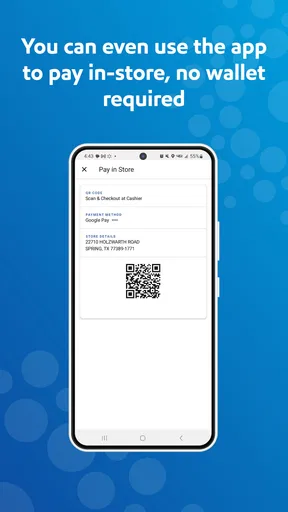
Exxon Mobil Rewards+ is a loyalty program that allows users to earn points for every fuel purchase and in-store transaction at participating Exxon and Mobil stations. Points can be redeemed for discounts on future purchases. Users simply need to download the app, sign up, and scan their QR code at checkout to start earning rewards.
How do I earn and redeem points with Exxon Mobil Rewards+?
You earn points by purchasing fuel or items in-store at participating Exxon and Mobil stations. Each gallon of fuel earns you points, and additional points can be earned through special promotions or when buying snacks and drinks. Points can be redeemed directly through the app for discounts on future fuel or store purchases.
Is Exxon Mobil Rewards+ compatible with both Android and iOS devices?
Yes, Exxon Mobil Rewards+ is available for both Android and iOS users. The app can be downloaded from the Google Play Store for Android devices and the Apple App Store for iOS devices. Ensure your device meets the minimum operating system requirements for smooth functionality.
Are there any fees associated with joining Exxon Mobil Rewards+?
No, joining the Exxon Mobil Rewards+ program is completely free. There are no membership fees or hidden costs. Simply download the app, create an account, and start earning points on your purchases with no additional charges.
Can Exxon Mobil Rewards+ points expire, and if so, how can I prevent that?
Yes, Exxon Mobil Rewards+ points can expire if there is no account activity for 12 consecutive months. To prevent points from expiring, ensure you make at least one qualifying purchase or redemption within that period. Regularly using the app and checking for promotions can help maintain your points balance.


